


Workers use SpotOnTask to find tasks, make offers, complete work, and receive payment through the platform. This guide explains how to set up your Worker account, build a profile Posters can trust, and start applying for suitable tasks.
Before you begin
Worker onboarding is currently available in Australia. If you select another country on the verification page, SpotOnTask will show whether onboarding is available or whether you can join the waitlist.
To get started, prepare:
- A clear profile photo and accurate contact details.
- A valid identity document and selfie for identity verification.
- Your Australian Business Number (ABN). Do not enter a Tax File Number (TFN).
- A short description of your experience and the services you offer.
- Photos or examples of previous work for your portfolio.
- Current licence documents if you offer regulated trade services.
Set up your Worker account
- Create your account: Sign up with your real name and an email address you can access.
- Complete your profile: Add your photo, location, introduction, experience, languages, and transport details in Account -> Profile.
- Verify your account: Open Account -> Verify account, select your Worker country, complete the identity check, and verify your tax details.
- Add your services: Choose at least one relevant category and describe your capabilities in Account -> Skills.
- Add a portfolio: Upload clear examples of your work in Account -> Portfolio.
- Prepare for payouts: Add your payout details and billing address in Account -> Payment methods.
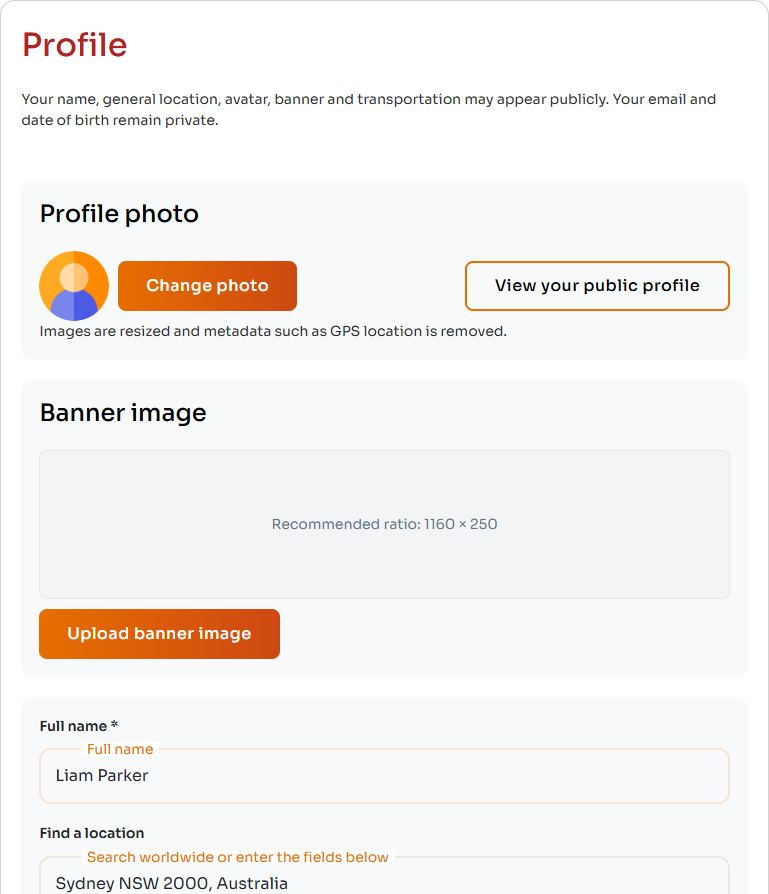
Start with a clear profile photo and accurate public profile details.
Account verification
Verification helps confirm who you are and strengthens trust with Posters. For Australian Worker onboarding, complete both the identity and ABN checks, then select Complete verification.
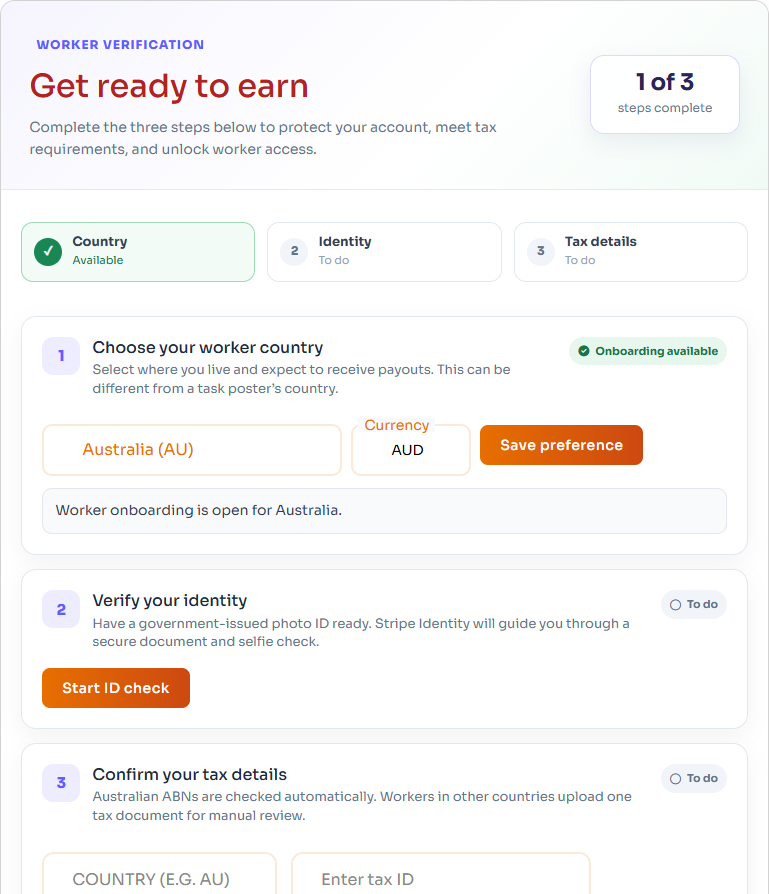
Worker verification shows the status of the country, identity, and tax-detail requirements.
Tips to avoid verification delays
- Use the same legal name and date of birth across your account, identity document, and tax details.
- Photograph the full identity document in good lighting, without blur, glare, or cropped edges.
- Enter your 11-digit ABN, not your TFN.
- Check that the ABN is active and matches your legal or business details.
- Follow any correction or resubmission instructions shown in your account.
How to appear on Our Workers
An active, public Worker account can appear on Our Workers. Adding service categories is especially important because Posters can filter Workers by category.
Worker results are ordered using several profile and marketplace signals, including:
- Matching and primary service categories.
- Completed tasks, ratings, review count, and completion rate.
- Location information.
- Verification and active badge information.
- Profile completeness and recent account activity.
Complete your profile honestly and keep it current. Adding information can improve how useful your profile is, but it does not guarantee a particular position in search results.
Build a profile Posters can trust
- Use a clear, recent profile photo.
- Explain what you do, where you work, and what makes your service reliable.
- Select only categories that match work you can safely and competently perform.
- Add relevant experience, qualifications, tools, transport, and languages.
- Upload genuine portfolio examples and remove personal or confidential information from images.
- Keep your location, availability, and contact details up to date.
Add relevant badges
Badges help Posters see verified information and qualifications. Open Account -> Badges to review the badges available to you.
- Verified Worker: Reflects completed identity and tax verification.
- Mobile verified: Confirms your mobile number.
- Police Check or Working With Children: Useful for relevant trust-sensitive work.
- Trade licences: Add current electrical, plumbing, or gasfitting credentials when required for the services you provide.
A badge is a trust signal, not permission to perform work outside your qualifications or legal authority. You remain responsible for holding any licence, insurance, permit, or registration required for a task.
Find tasks and make offers
- Open Browse tasks and look for work that matches your skills, location, licences, and availability.
- Read the full task description, timing, budget, location, photos, and questions.
- Make a fixed-price offer that covers the agreed scope.
- Before submitting, check the offer amount, service fee, and You'll receive amount.
- Write a specific message explaining your relevant experience, availability, what is included, and any questions you need answered.
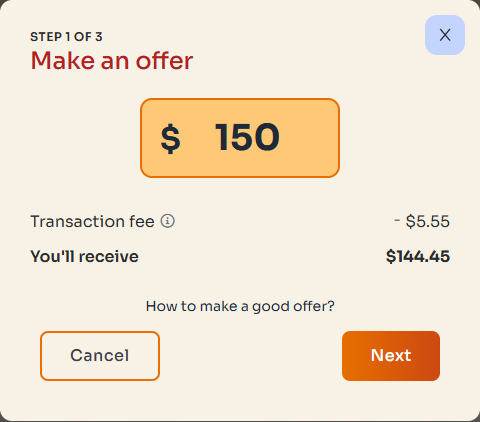
Before submitting an offer, check the fee and You'll receive amount. These example amounts are not a quote for your task.
After your offer is accepted
- Confirm the scope, schedule, location, access, and responsibility for materials before starting.
- Keep important discussions and changes in the SpotOnTask task conversation.
- Communicate promptly if the timing or scope needs to change.
- Complete the work safely and according to the agreement.
- Request payment only after the agreed work is complete.
- After the Poster releases payment, your net earnings are added to your available balance.
Prepare to receive your earnings
Before cashing out, you must complete Stripe payout setup, add your billing address, enable two-factor authentication, and have an available balance of more than $10. You can manage these requirements in Account -> Payment methods.
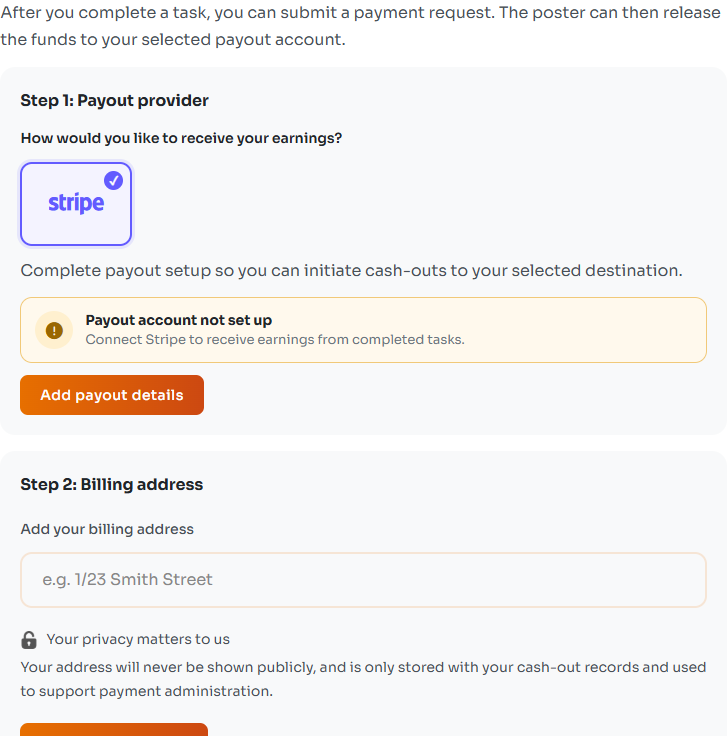
Prepare your payout details and billing address in Payment methods.
Common setup problems
- Your account does not appear in a category: Add that service category in Account -> Skills.
- Your profile has little information: Add experience, location, skills, and portfolio examples.
- Verification will not complete: Confirm that both identity and tax checks are verified and that Worker onboarding is available for your selected country.
- A document was rejected: Review the reason, correct the flagged issue, and submit a clear current document.
- You cannot cash out: Check your balance, payout setup, billing address, and two-factor authentication.
When to contact support
Contact support if Worker onboarding should be available but verification remains stuck, your approved details are not reflected on your account, or you cannot use Worker features after completing the required steps. Include your account email, the page you were using, and a screenshot of the status or error. Do not send your TFN, full identity document number, password, or two-factor authentication code.